Ultimate List View
Supercharge Odoo's standard list view with direct header-based filtering, simultaneous multi-filter support, and data export to PDF, Excel, and CSV — all accessible from the table header without navigating complex search menus.
Ultimate List View
Supercharge Odoo's standard list view with direct header-based filtering, simultaneous multi-filter support, and data export to PDF, Excel, and CSV — all accessible from the table header without navigating complex search menus.
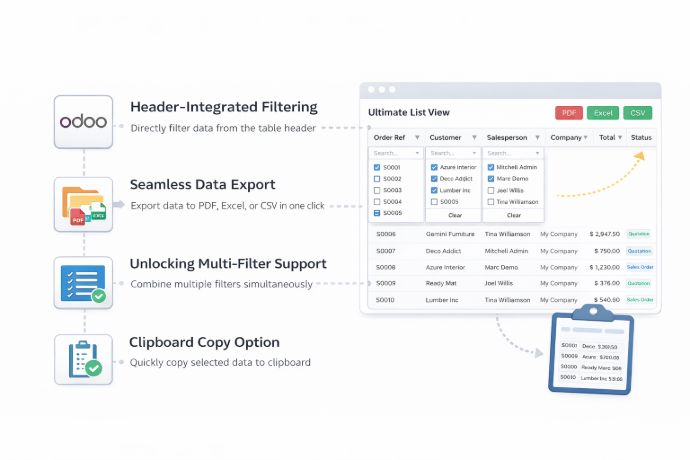
What is the Ultimate List View Module?
Ultimate List View enhances Odoo's standard list view with powerful filtering, export, and data interaction capabilities. Users can filter records directly from column headers, apply multiple filters simultaneously, export data in multiple formats, and copy records to the clipboard — all without navigating complex search menus.
- Header-Based Filtering — Filter records directly from table column headers for faster, more intuitive data retrieval.
- Multi-Filter Support — Apply multiple filters at the same time to narrow down results with precision across large datasets.
- Multi-Format Data Export — Export filtered or full list data to PDF, Excel, and CSV with a single click for reporting and analysis.
- Clipboard Copy Functionality — Copy selected records to the clipboard instantly for quick data sharing or paste operations.
- Date Picker in Header — Select date ranges directly from the column header using an embedded date picker for date-based filtering.
- Selection Field Dropdown Filtering — Filter selection-type fields via dropdown menus integrated directly into the list view header.
Whether working with large customer lists, inventory records, or sales orders, Ultimate List View gives Odoo users the tools to search, filter, and export data more efficiently — directly from the interface they already use every day.
What is the Ultimate List View Module?
Ultimate List View enhances Odoo's standard list view with powerful filtering, export, and data interaction capabilities. Users can filter records directly from column headers, apply multiple filters simultaneously, export data in multiple formats, and copy records to the clipboard — all without navigating complex search menus.
- Header-Based Filtering — Filter records directly from table column headers for faster, more intuitive data retrieval.
- Multi-Filter Support — Apply multiple filters at the same time to narrow down results with precision across large datasets.
- Multi-Format Data Export — Export filtered or full list data to PDF, Excel, and CSV with a single click for reporting and analysis.
- Clipboard Copy Functionality — Copy selected records to the clipboard instantly for quick data sharing or paste operations.
- Date Picker in Header — Select date ranges directly from the column header using an embedded date picker for date-based filtering.
- Selection Field Dropdown Filtering — Filter selection-type fields via dropdown menus integrated directly into the list view header.
Whether working with large customer lists, inventory records, or sales orders, Ultimate List View gives Odoo users the tools to search, filter, and export data more efficiently — directly from the interface they already use every day.
Why Businesses Need Ultimate List View
Odoo's default list view makes finding and exporting specific records cumbersome. Ultimate List View brings powerful filtering and export capabilities directly to the table interface.
Common Challenges
Inefficient Search Navigation
Finding specific records in large Odoo lists requires navigating separate search bars and filter dropdowns — slowing down everyday operations.
Limited Export Options
Odoo's standard export lacks direct PDF, Excel, and CSV options from the list view, requiring extra steps or external tools for reporting.
Single Filter Restrictions
Applying multiple simultaneous filters in Odoo's default list view is clunky and does not support the precision filtering most business workflows require.
No Clipboard Integration
Copying records from Odoo list views for use in other applications requires manual workarounds with no native clipboard support.
How Ultimate List View Solves It
Direct Header-Integrated Filtering
Filter records directly from table column headers — no navigation required. Date pickers and dropdown menus are embedded right in the list view interface.
One-Click Multi-Format Export
Export list data to PDF, Excel, or CSV directly from the view for immediate use in reports, presentations, or external tools.
Simultaneous Multi-Filter Support
Apply multiple filters at the same time to pinpoint exactly the records needed — with precision filtering across text, date, and selection fields.
Instant Clipboard Copy
Copy selected records to the clipboard with a single click for seamless data transfer to other applications without manual workarounds.
Why Businesses Need Ultimate List View
Odoo's default list view makes finding and exporting specific records cumbersome. Ultimate List View brings powerful filtering and export capabilities directly to the table interface.
Common Challenges
Inefficient Search Navigation
Finding specific records in large Odoo lists requires navigating separate search bars and filter dropdowns — slowing down everyday operations.
Limited Export Options
Odoo's standard export lacks direct PDF, Excel, and CSV options from the list view, requiring extra steps or external tools for reporting.
Single Filter Restrictions
Applying multiple simultaneous filters in Odoo's default list view is clunky and does not support the precision filtering most business workflows require.
No Clipboard Integration
Copying records from Odoo list views for use in other applications requires manual workarounds with no native clipboard support.
How Ultimate List View Solves It
Direct Header-Integrated Filtering
Filter records directly from table column headers — no navigation required. Date pickers and dropdown menus are embedded right in the list view interface.
One-Click Multi-Format Export
Export list data to PDF, Excel, or CSV directly from the view for immediate use in reports, presentations, or external tools.
Simultaneous Multi-Filter Support
Apply multiple filters at the same time to pinpoint exactly the records needed — with precision filtering across text, date, and selection fields.
Instant Clipboard Copy
Copy selected records to the clipboard with a single click for seamless data transfer to other applications without manual workarounds.
Core Features of Ultimate List View
Powerful list view enhancements to filter, export, and interact with Odoo records more efficiently
Header-Integrated Filtering
Allows users to filter records directly from the table header in list views, enhancing efficiency and streamlining search without navigating complex menus or separate filter panels.
Seamless Data Export
Enables users to export data effortlessly in multiple formats including PDF, Excel, and CSV for comprehensive reporting capabilities directly from the Odoo list view.
Unlocking Multi-Filter Support
Incorporates the capability to apply multiple filters simultaneously, elevating data retrieval to enhanced precision and efficiency levels across all Odoo list views.
Clipboard Copy Option
Introduces functionality allowing users to efficiently copy records to the clipboard with a single click for seamless data management and transfer to external applications.
Applying Filters
Allows effortless date selection through an embedded Date Picker integrated directly into the column header, enabling precise date-based filtering with filters removed via the parent search bar facet.
Selection Field
Enables filtering by selection-type fields through dropdown menus embedded in the list view header, allowing records to be filtered based on the selected option values.
Search Result Data
Supports text search initiation with the Enter key across other field types, with backspace reverting the view to remove applied filters and restore the full record set.
Core Features of Ultimate List View
Powerful list view enhancements to filter, export, and interact with Odoo records more efficiently
Header-Integrated Filtering
Allows users to filter records directly from the table header in list views, enhancing efficiency and streamlining search without navigating complex menus or separate filter panels.
Seamless Data Export
Enables users to export data effortlessly in multiple formats including PDF, Excel, and CSV for comprehensive reporting capabilities directly from the Odoo list view.
Unlocking Multi-Filter Support
Incorporates the capability to apply multiple filters simultaneously, elevating data retrieval to enhanced precision and efficiency levels across all Odoo list views.
Clipboard Copy Option
Introduces functionality allowing users to efficiently copy records to the clipboard with a single click for seamless data management and transfer to external applications.
Applying Filters
Allows effortless date selection through an embedded Date Picker integrated directly into the column header, enabling precise date-based filtering with filters removed via the parent search bar facet.
Selection Field
Enables filtering by selection-type fields through dropdown menus embedded in the list view header, allowing records to be filtered based on the selected option values.
Search Result Data
Supports text search initiation with the Enter key across other field types, with backspace reverting the view to remove applied filters and restore the full record set.
How to Use Ultimate List View
Follow these steps to filter, export, and interact with Odoo list view records efficiently
Install the Module
Install Ultimate List View from the Apps section in your Odoo instance or purchase it from the Odoo App Store.
Open Any List View
Navigate to any model's list view in Odoo — such as Customers, Products, or Sales Orders — to access the enhanced filtering and export capabilities.
Filter via Column Headers
Click on any column header to activate the header filter for that field. Type a search value and press Enter to filter records directly from the table header.
Apply Multiple Filters Simultaneously
Add filters on multiple columns at the same time — the module applies all active filters together for precise, multi-condition record retrieval.
Use Date Picker for Date Fields
For date-type columns, the header displays an embedded Date Picker — select your date range directly in the header to filter records by date without navigating the search bar.
Filter by Selection Fields
For selection-type columns, use the dropdown menu in the header to filter records by a specific selection value instantly.
Export Data
Use the export feature to download the current list view data in PDF, Excel, or CSV format for reporting, analysis, or sharing with stakeholders.
Copy Records to Clipboard
Select the records you need and use the Clipboard Copy option to copy them with a single click for quick data transfer to other applications.
How to Use Ultimate List View
Follow these steps to filter, export, and interact with Odoo list view records efficiently
Install the Module
Install Ultimate List View from the Apps section in your Odoo instance or purchase it from the Odoo App Store.
Open Any List View
Navigate to any model's list view in Odoo — such as Customers, Products, or Sales Orders — to access the enhanced filtering and export capabilities.
Filter via Column Headers
Click on any column header to activate the header filter for that field. Type a search value and press Enter to filter records directly from the table header.
Apply Multiple Filters Simultaneously
Add filters on multiple columns at the same time — the module applies all active filters together for precise, multi-condition record retrieval.
Use Date Picker for Date Fields
For date-type columns, the header displays an embedded Date Picker — select your date range directly in the header to filter records by date without navigating the search bar.
Filter by Selection Fields
For selection-type columns, use the dropdown menu in the header to filter records by a specific selection value instantly.
Export Data
Use the export feature to download the current list view data in PDF, Excel, or CSV format for reporting, analysis, or sharing with stakeholders.
Copy Records to Clipboard
Select the records you need and use the Clipboard Copy option to copy them with a single click for quick data transfer to other applications.
Versions & Documentation
Choose your Odoo version and explore interactive documentation
Versions & Documentation
Choose your Odoo version and explore interactive documentation
Frequently Asked Questions
Find answers to common questions about Ultimate List View
Which Odoo versions are supported?
What export formats are available?
Can I apply multiple filters at the same time?
How does the clipboard copy feature work?
Which field types support header filtering?
Frequently Asked Questions
Find answers to common questions about Ultimate List View